
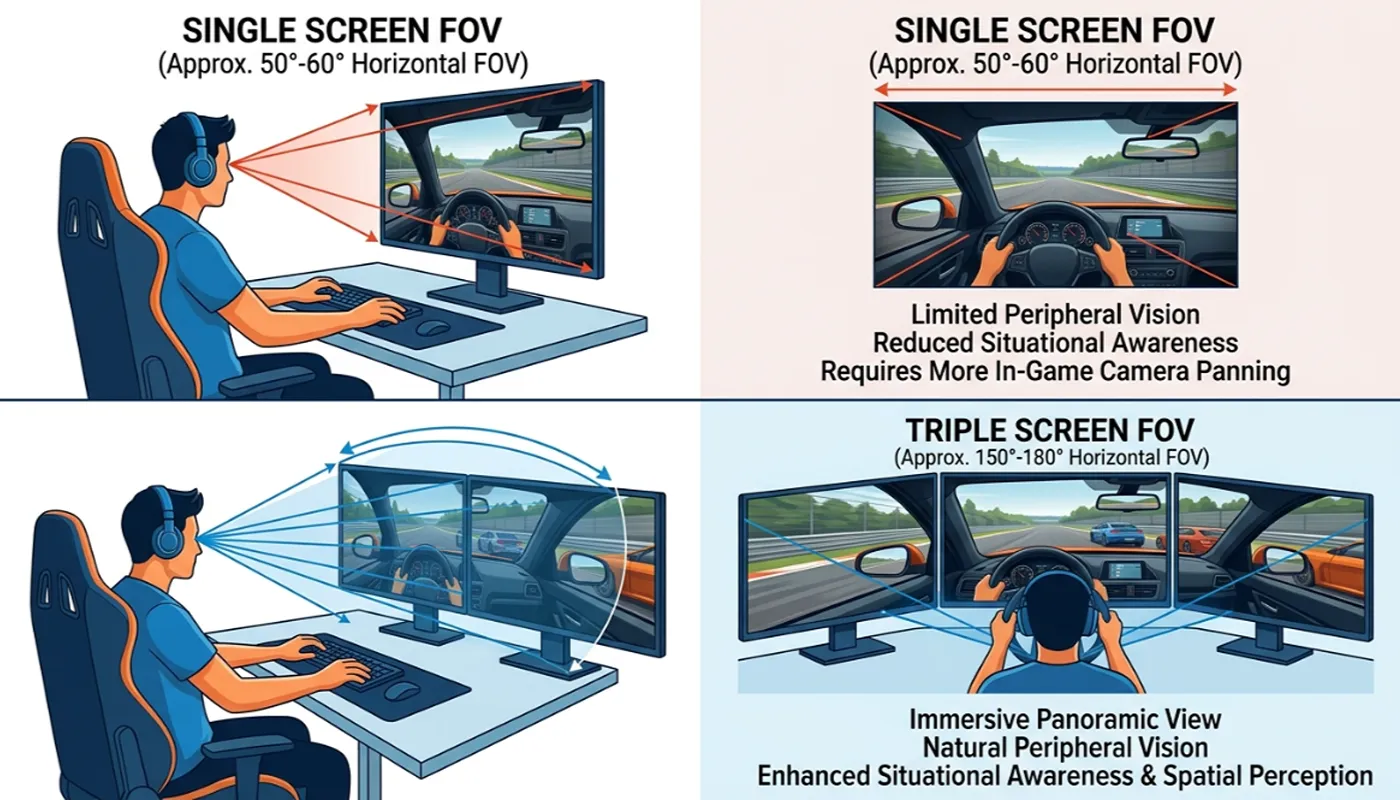
Choosing between a single screen vs triple screen FOV setup is one of the first big decisions in sim racing. Diving into the world of sim racing unveils a crucial decision for any enthusiast: optimizing the visual experience with a focus on the center of the screen.
This guide meticulously compares triple monitor setups against ultrawide screens, dissecting their impact on field of view (FOV) and overall immersion. We’ll explore the nuances of each screen setup, offering insights to help you craft the ultimate sim racing rig.
Introduction to Sim Racing Setups
Before we talk about FOV settings for each option, it helps to understand why the screen matters so much in the first place. Your display is what turns raw inputs into a believable sense of speed and distance on track.
Overview of Sim Racing
Sim racing, or simulated racing, transcends a mere video game; it’s a dedicated hobby for those passionate about motorsports, offering a highly realistic driving experience on one screen or a triple monitor setup. Some racers stick with three monitors for years once they experience the extra peripheral vision.
Enthusiasts invest significant time and resources into building their ultimate rig, encompassing everything from force-feedback steering wheels and pedal sets to advanced motion platforms. This sim gear is what makes the hobby feel like real motorsport.
The objective is to replicate the sensation of real-world racing as closely as possible, fostering a profound sense of speed and immersion. The visual component, specifically the screen setup, plays an absolutely pivotal role in achieving this level of realism and making the sim racing experience truly captivating.
Importance of Screen Setup
The screen setup is arguably the most critical component after the fundamental controls in any sim racing rig, profoundly influencing immersion and performance, especially when using 3 monitors.
Whether opting for a single monitor, a sophisticated triple monitor setup, or a wide ultrawide screen, the display choice dictates how much of the virtual track environment is visible and how realistically depth and speed are perceived.
A well-chosen screen setup enhances the racing experience by providing a wider field of view, allowing drivers to better anticipate corners, spot competitors, and react more effectively, thereby elevating the overall sim racing experience considerably.
Field of View (FOV) Explained
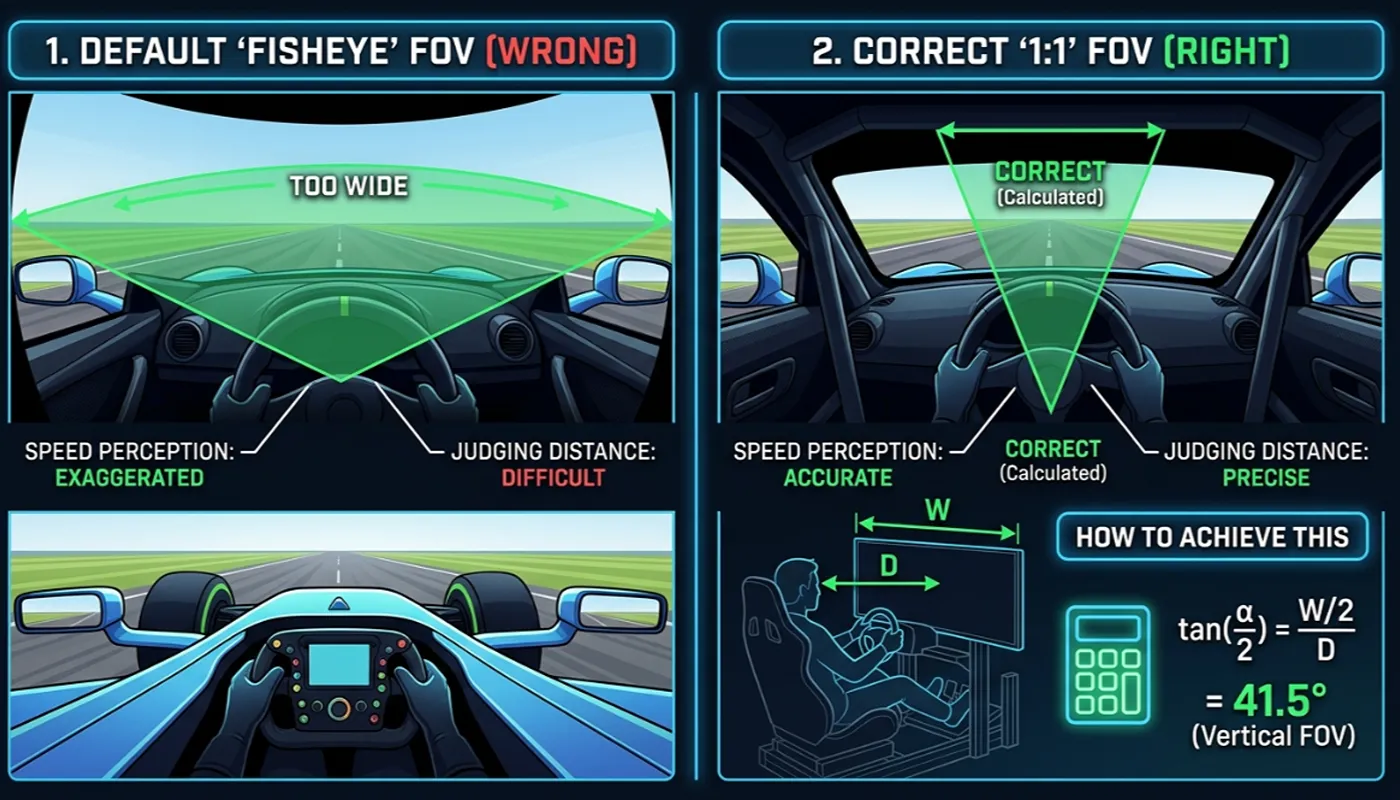
Field of View, or FOV, in sim racing, refers to the extent of the observable game world visible on your screen at any given moment, and is influenced by the distance to screen. This is typically measured outward from the centre screen in a multi-monitor setup.
A mathematically correct FOV, measured in degrees of horizontal FOV, is paramount for achieving a realistic sense of speed and scale, preventing the distorted perception often associated with incorrect FOV settings. An incorrect field of view provides a distorted, unrealistic sense of speed, while getting it right mirrors your real-life physical field of view as closely as possible.
Many sim racers strive for a setup that provides a wide horizontal FOV, enhancing peripheral vision, which is crucial for awareness on the track. Understanding how to correctly set FOV, whether on a single screen, ultrawide monitor, or especially a triple screen setup, is fundamental to maximizing immersion and gaining a competitive edge in any sim racing title, creating a truly believable racing experience.
You can get this exact number from our FOV calculator.
Triple Monitor Setup
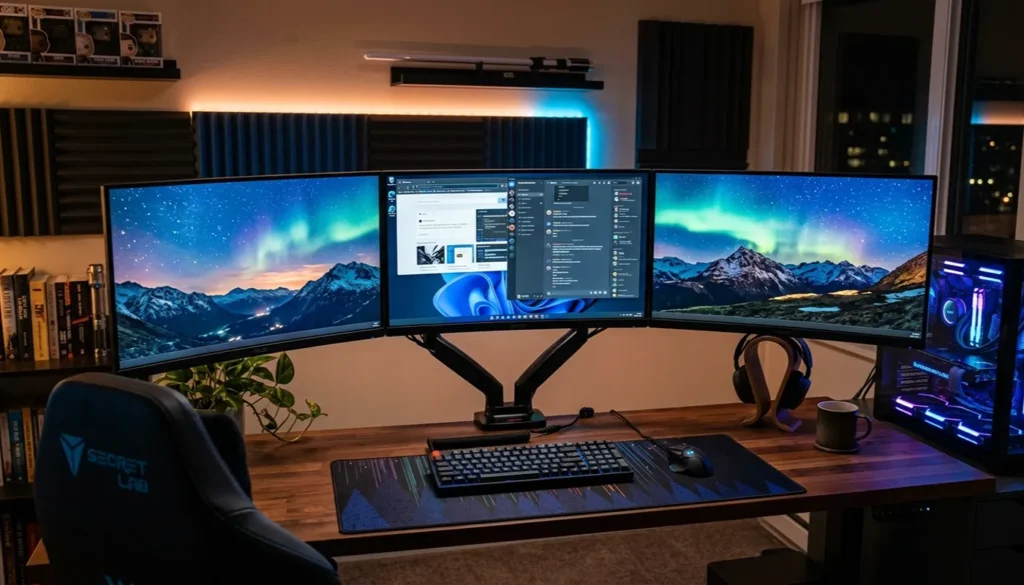
A triple monitor setup wraps three screens around the driver for the widest possible view of the track. It’s the setup most competitive sim racers reach for when immersion and peripheral awareness matter most.
Benefits of Triple Monitors
A triple monitor setup significantly elevates the sim racing experience, offering unparalleled immersion compared to a single screen or even an ultrawide monitor. The primary benefit lies in the dramatically increased horizontal FOV, which encompasses a much wider peripheral vision.
This setup is especially popular in leagues where triple screens are employed for serious competition. This expanded field of view allows sim racers to perceive approaching corners and competitors with greater accuracy, enhancing their sense of speed and overall track awareness, particularly in games like Assetto Corsa.
Side monitors also trigger quick reflexes from the other screens the instant a rival car enters your peripheral vision. The side monitors effectively wrap around the driver, creating a more natural and realistic cockpit view that profoundly deepens the immersion, making the sim racing experience feel incredibly lifelike and competitive.
Choosing the Right Monitors for a Triple Screen Setup
Selecting the right monitors is crucial for a successful triple screen setup. While many modern monitors can be used, ensuring uniformity across all three screens is highly recommended for a seamless racing experience, particularly in a triple setup.
Many sim racers opt for triple 1440p monitors, a kind of triple screens, striking a balance between visual fidelity and performance. Some now pick triple 4K monitors instead for even sharper detail.
Consider monitors with thin bezels to minimize the gaps between screens, further enhancing immersion. Thin screen bezels make the biggest visual difference once everything is lined up.
The overall monitor setup should be robust enough to support the weight and angle adjustments of three screens, ensuring stability for your sim racing rig, especially when using screen support such as rFactor. Always measure your seating distance to the center monitor first, since a typical rig is 3 x 27-inch panels.
| Recommended Uniformity | Benefit |
|---|---|
| Screen size can significantly affect the overall experience in sim racing, making it crucial to consider the distance to screen and screen height for optimal immersion. | Seamless racing experience on a single wide screen. |
| Resolution | |
| Refresh rate |
Optimal FOV Adjustments for Triple Monitors
Achieving a mathematically correct FOV is paramount for a triple monitor setup to fully leverage its advantages. Unlike a single monitor, a triple screen setup allows for a much wider horizontal FOV, which must be accurately calculated based on screen size, distance from the eye, and the angle of the side monitors.
That number depends heavily on the distance to your eyes as well as screen size, and those resultant screen angles feed directly into the FOV formula. Most sim racing titles with proper triple screen support offer in-game settings to set FOV for each screen individually, or to calculate the total horizontal FOV.
Proper FOV adjustments ensure that objects appear at their correct size and distance, eliminating distortion and providing a realistic sense of speed, which is vital for competitive sim racing, especially when using only a proper FOV. You can walk through the full math in our how to calculate FOV guide.
Ultrawide Screen Setup
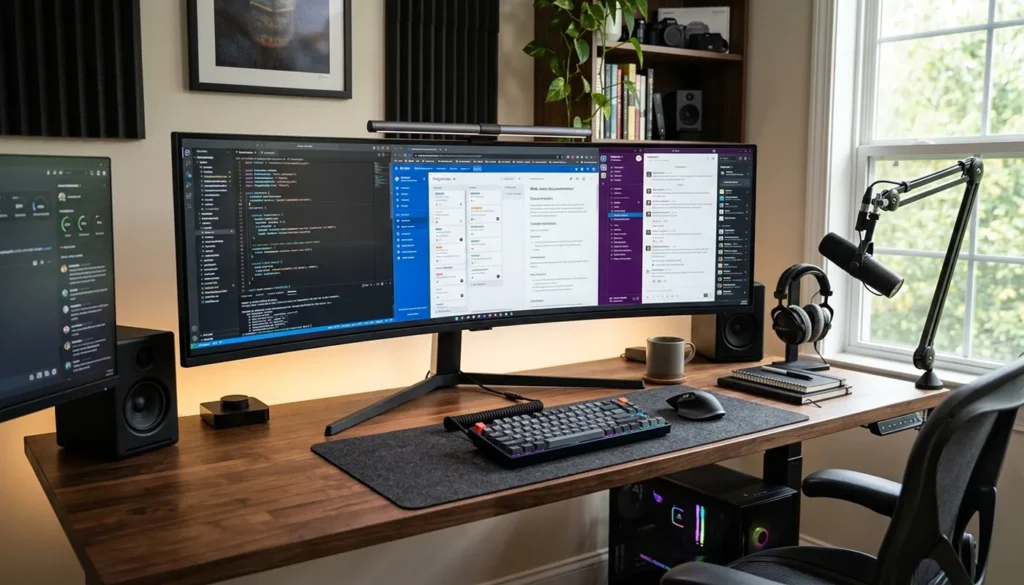
An ultrawide monitor offers a simpler alternative to running three separate screens. It trades some peripheral coverage for a cleaner, single-panel setup.
Advantages of Ultrawide Screens
Ultrawide monitors offer a compelling alternative to a traditional single screen or even a triple monitor setup for many sim racing enthusiasts. The primary advantage of an ultrawide screen lies in its expanded horizontal FOV without the bezels that interrupt the image on a triple screen setup.
The image stretches across the full screen width with no interruption, and many of these panels are also curved screens that wrap gently toward your peripheral vision. This provides a continuously wide field of view, which significantly enhances immersion by encompassing more of the virtual track environment.
An ultrawide monitor setup can often be simpler to configure than running triple monitors, requiring less space and fewer cables, making it an attractive option for those seeking a streamlined yet highly immersive sim racing experience.
FOV Considerations with Ultrawide Monitors
While an ultrawide monitor delivers an impressive horizontal FOV, achieving a mathematically correct FOV still requires careful consideration. Unlike a triple monitor setup where the field of view wraps around the driver, an ultrawide screen presents a single, wide image that dominates the middle of the screen.
Therefore, the FOV settings in sim racing titles need to be adjusted to match the screen size and the distance from the driver’s eyes to ensure a realistic sense of speed and scale. FOV settings should always match your monitor size exactly, and most titles let you get the FOV set to match the panel’s curve directly.
Many sim racing games now offer specific ultrawide support, allowing players to set FOV appropriately for their ultrawide monitor, preventing distortion and maximizing the benefits of the wider display for an enhanced racing experience. Check our FOV settings by game guide for exact values per title.
Immersion Factors in Ultrawide Sim Racing
The immersion offered by an ultrawide monitor in sim racing is substantial, though different from the all-encompassing feel of a triple screen setup. The continuous, expansive image on an ultrawide screen eliminates bezel breaks, which can be a significant immersion factor for some drivers.
This is especially noticeable during night racing, when track lighting stretches smoothly across the panel instead of splitting across seams. The wider horizontal FOV inherently draws the driver further into the racing experience, allowing for better peripheral awareness and a more natural perception of the track and other cars.
While it might not replicate the extreme peripheral vision of 3 screens, an ultrawide monitor still provides a highly engaging and immersive sim racing environment, striking an excellent balance between a single screen and a full triple monitor setup.
Comparing Triple Monitors vs. Ultrawide
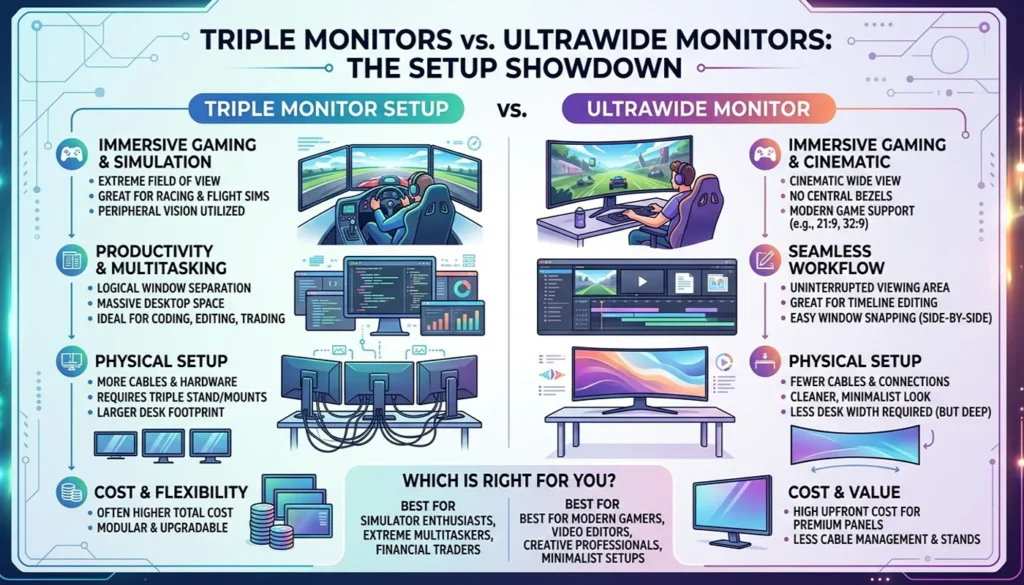
A single screen ordinarily gives you the narrowest FOV of the three options, with triple monitors and ultrawide panels each pushing that boundary differently. The right choice comes down to budget, space, and how much immersion you want.
Performance and Immersion Differences
When comparing the performance and immersion differences between a triple monitor setup and an ultrawide monitor, the key distinction often lies in the overall field of view and how it wraps around the driver. The table below highlights some of these differences:
| Feature | Triple Monitor Setup | Ultrawide Monitor |
|---|---|---|
| Horizontal FOV is significantly affected by the choice between a triple monitor setup and a wide screen. | Unparalleled, nearly 180-degree view, extreme peripheral vision | Wider than a single monitor, but less enveloping than three screens |
| Wrap-around Effect | Significant, enhances sense of speed and immersion | Cannot replicate the same effect |
| Bezels can disrupt the visual flow in a triple monitor setup, making it less immersive compared to a single wide screen. | Present | Lack of bezels for a continuous image |
While the lack of bezels on an ultrawide is a clear advantage for a continuous image, the sheer breadth of a triple monitor setup often wins for ultimate immersion in sim racing. The larger the screen or panel combination you choose, the wider your usable FOV becomes either way.
Cost Considerations for Each Setup
Cost is a significant factor when deciding between a triple monitor setup and an ultrawide monitor for your sim racing rig. Evaluating the total cost of ownership, including the necessary hardware to support each screen setup, is crucial for any sim racing enthusiast.
| Feature | Triple Monitor Setup | Ultrawide Monitor |
|---|---|---|
| Monitor Purchase | Three individual monitors (e.g., triple 1440p) | One monitor (can be more expensive than a single monitor) |
| Additional Hardware | A robust triple monitor stand, more cables, and potentially a more powerful graphics card are essential for optimizing a triple setup. | Typically one stand, fewer cables |
| Potential Cost | Quickly adds up, especially with high-refresh-rate, high-resolution screens in a triple setup. | Initial investment potentially lower, but high-end models can rival the cost of three mid-range screens |
Community Preferences and Recommendations
The sim racing community often has strong preferences when it comes to screen setups, with many advocating for a triple monitor setup as the gold standard for immersion and competitive advantage. Discussions frequently revolve around achieving a mathematically correct FOV, with triple screens generally providing the most accurate representation of scale and distance due to the expansive horizontal FOV.
However, the convenience and simplicity of an ultrawide monitor, which eliminates bezel lines and requires less setup space, makes it a popular choice for those who prioritize a clean aesthetic or have limited room. While titles with proper triple screen support are widely praised, many newer sim racing titles also offer excellent ultrawide support.
Ultimately, recommendations for the right TV for sim racing often come down to personal budget, available space, and the desired level of immersion for one’s sim racing experience. Our FOV FAQ covers the most common questions racers ask when picking between the two.
Final Thoughts on Sim Racing Screen Setups
Getting the FOV right matters more than which screen setup you choose. Both options beat a single monitor by a wide margin once properly configured.
Which Setup is Right for You?
Choosing between a triple monitor setup and an ultrawide monitor largely depends on individual priorities, budget, and the space available for your sim racing rig, as well as the proper and mathematically correct setup for optimal performance. If ultimate immersion, an expansive horizontal FOV, and the most realistic sense of speed are paramount, and you have the budget and space, a triple screen setup, especially with proper FOV settings, is likely the superior choice.
For many competitive racers, a triple monitor setup is the holy grail of immersion. The ability to calculate the total horizontal FOV and experience true peripheral vision is unmatched.
However, if you seek a streamlined setup, a continuous image without bezel breaks, and a significant upgrade from a single screen, an ultrawide monitor offers an excellent balance of immersion and practicality. Both options provide a vastly improved racing experience over a single monitor, but the “right” screen setup is deeply personal to each sim racer, depending on their preferences and the setup guide they follow.
A poorly matched FOV can quietly cost you time on track, as we cover in how wrong FOV costs lap time.
The Future of Sim Racing Technology
The future of sim racing technology promises even greater immersion and realism, with screen setups continuing to evolve. While triple monitor setups and ultrawide screens currently dominate, advancements in display technology, such as increasingly higher refresh rates, resolutions, and even more aggressive curves on ultrawide monitors, will further enhance the sim racing experience.
A few enthusiasts even set up a projector screen for an even larger field of view than any monitor can offer. The integration of VR (virtual reality) also represents a significant leap, offering complete immersion, although it comes with its own set of challenges, such as comfort and motion sickness for some users.
As hardware becomes more powerful and accessible, we can expect sim racing titles to offer even more sophisticated support for various screen configurations, allowing every sim racer to achieve a mathematically correct FOV and an unparalleled sense of speed, regardless of their chosen screen setup.
Conclusion
In conclusion, both triple monitor setups and ultrawide monitors offer compelling advantages for enhancing the sim racing experience beyond a single screen. A triple monitor setup excels in delivering an expansive horizontal FOV and supreme immersion, creating an almost real-world cockpit view that is ideal for competitive sim racing.
Conversely, an ultrawide monitor provides a continuous, wide field of view without bezels, offering a cleaner aesthetic and often simpler setup compared to a kind of triple screens. The decision ultimately hinges on factors such as budget, space, and personal preference for immersion, particularly when considering the arrangement of side screens.
Regardless of the choice, correctly setting the FOV is crucial for maximizing the benefits of either screen setup, ensuring a realistic sense of speed and an engaging racing experience in your sim racing rig. Both options significantly elevate the sim racing journey, making every lap more captivating.